 Subs
SubsA subscription tracker app for iPhone that never asks for your bank login
Subs is a subscription tracker and manager for iPhone. You add what you pay for by picking from 80+ built-in services, typing it in, or importing a screenshot or PDF of your card statement, and Subs reminds you before every renewal and before free trials turn into paid plans. It doesn't connect to your bank or read your email, and it can't cancel anything for you: it shows you where to cancel and reminds you in time.
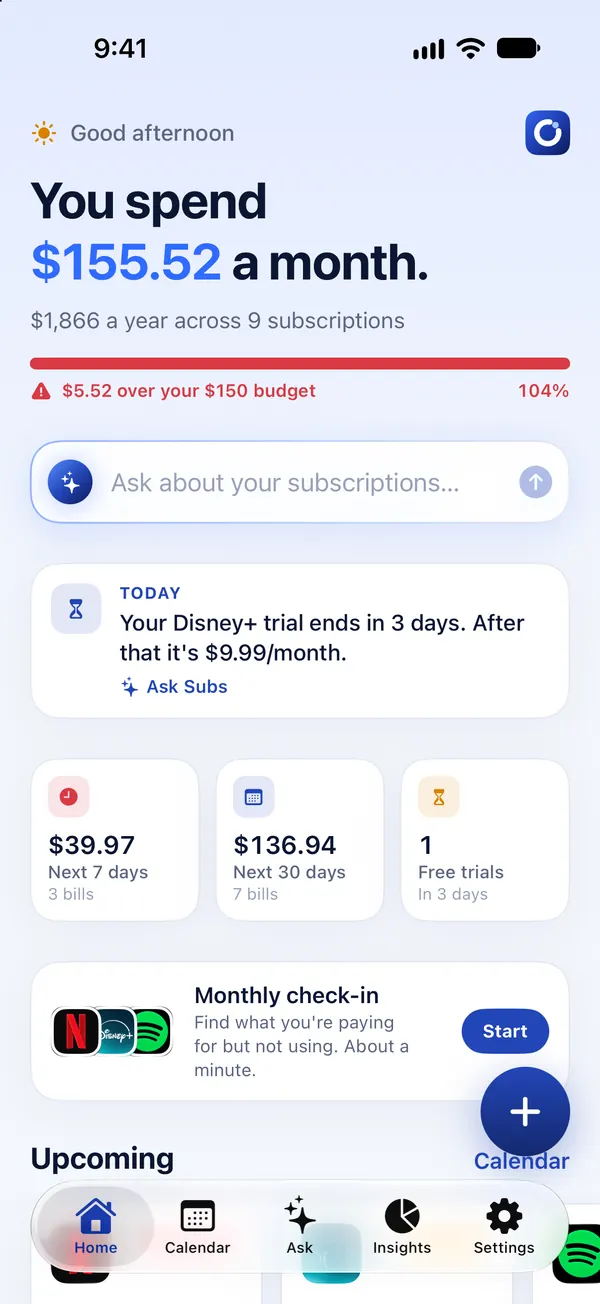
What a subscription tracker is for
Your iPhone already lists the subscriptions Apple bills you for, but most people pay for more than that: streaming services they joined on the web, software billed to a card, a gym, a phone plan, a buy-now-pay-later plan. A subscription tracker puts all of them in one list so you can answer three questions:
- What am I paying for? Every recurring charge, whoever bills it.
- What's due next? A reminder before the money leaves, while you can still cancel.
- What does it add up to? A monthly and yearly total, so the small charges stop hiding.
Two kinds of tracker, and which one Subs is
Subscription apps find your subscriptions in one of two ways. Neither is wrong; they suit different people.
| Bank-linked trackers | Subs | |
|---|---|---|
| How subscriptions get in | You sign in to your bank through the app and it scans your transactions | You pick from a list, type them in, or import a screenshot or PDF statement that is read on your iPhone |
| What you hand over | Ongoing access to your account transactions | No bank login, no email access, no name or email address |
| New charges | Picked up automatically | Not automatic: you add them, or import a newer statement |
| Best for | People who want a full budgeting app and are comfortable linking accounts | People who want reminders and a clear list without linking anything |
If automatic detection matters more to you than keeping your bank out of it, a bank-linked app is the better fit. See how Subs compares with Rocket Money for a side-by-side.
Adding your subscriptions
- Pick from 80+ services. Netflix, Spotify, iCloud+, ChatGPT and other popular services are built in with a typical US price you can edit.
- Import a screenshot or statement. Choose a screenshot of your banking app, a photo, or a PDF card statement. Subs reads it on your iPhone, picks out recurring charges, installment plans and monthly bills, skips one-off purchases, and lets you untick anything before saving. The file is never uploaded.
- Type anything else. A gym, a magazine, a domain name: any name, price and billing cycle (weekly, monthly, quarterly, every six months or yearly).
- Ask for it. With Ask Subs you can say “Add Netflix, $17.99 on the 12th” and confirm with a tap.
Reminders before the charge, not after
Each subscription has its own reminder: on the day, one, two or three days before, or a week before. Free trials get a reminder before they convert to a paid plan. Reminders are scheduled on your iPhone itself.
There's also a monthly check-in, a one-minute review where you rate how often you use each subscription and see what you'd save by canceling the ones you rarely open, and a Monday summary of the week's payments.
What else it tracks
- Free trials, with the end date and the price afterwards.
- Installment plans, with a count of the payments left.
- Monthly bills such as phone and internet.
- Price changes. Record a new price and Subs keeps the history and shows what the increase costs per year.
- A monthly budget with a progress bar.
- Home and Lock Screen widgets for your next payments.
Help when you want to cancel
Open any subscription in Subs and you get a cancel card: a button that opens Apple's subscription list if Apple bills you, or the service's own account page for services billed directly, a link to request an Apple refund, and a ready-to-send cancellation or refund email written on your iPhone.
Our cancel guides go further for the services people ask about most, such as Netflix, Audible and Amazon Prime.
What Subs doesn't do
- It doesn't cancel for you. Only you can sign in to your accounts. Subs gets you to the right page and reminds you in time. More on this in apps that cancel subscriptions.
- It doesn't watch your bank account. A new subscription appears in Subs when you add it or import a statement.
- It's iPhone only. There is no Android, iPad or web version.
- It isn't a full budgeting app. It tracks recurring payments, not groceries or rent splits.
Free and Premium
Subs is free to download, and you can set up your list and see what it adds up to without paying. Using it day to day needs Subs Premium, an auto-renewing subscription: adding more subscriptions later, opening their details and cancel help, importing statements, the payment calendar, spending insights and Ask Subs are all part of it.
Prices vary by country, so the app shows the price before you subscribe. You can cancel any time in your iPhone's Settings.
Privacy
Subs never asks for your name, email address, bank login or access to your email. The subscriptions you add are saved to an anonymous account so they're still there if you reinstall the app. Statements and screenshots are read on your iPhone and never uploaded, and Ask Subs runs on-device with Apple Intelligence. The details are in the privacy policy.
Frequently asked questions
Is there a subscription tracker that doesn't link to my bank?
Yes. Subs never asks for a bank login. You add subscriptions from a built-in list, type them in, or import a screenshot or PDF statement that is read on your iPhone and never uploaded.
Does Subs track subscriptions that aren't billed by Apple?
Yes. You can add anything with a recurring price: services you pay for by card or PayPal, installment plans and monthly bills, alongside your App Store subscriptions.
Will Subs find my subscriptions automatically?
Not from your bank account, because it never connects to one. It finds recurring charges in a screenshot or PDF statement you choose to import, and you review the list before anything is saved.
Can Subs cancel a subscription for me?
No. Subs can't sign in to your accounts. It opens the right cancel page, shows the steps for popular services and can write a cancellation or refund email for you to send.
Does Subs work on Android or iPad?
No. Subs is an iPhone app for iOS 17 or later.
Is Subs free?
Subs is free to download and you can set up your list without paying. Day-to-day use, including adding subscriptions later, importing statements, the calendar, insights and Ask Subs, needs Subs Premium. The app shows the price before you subscribe.