 Subs
SubsAsk Subs: a private AI assistant that knows your subscriptions
Ask Subs is the assistant inside the Subs app. It answers questions about the subscriptions you track, such as what's due this week, what you could cancel and how much you spend in a year, and it can add a subscription, record a price change or write a cancellation email after you confirm. It runs on Apple Intelligence on your iPhone, so your questions and your spending are never sent to a server.
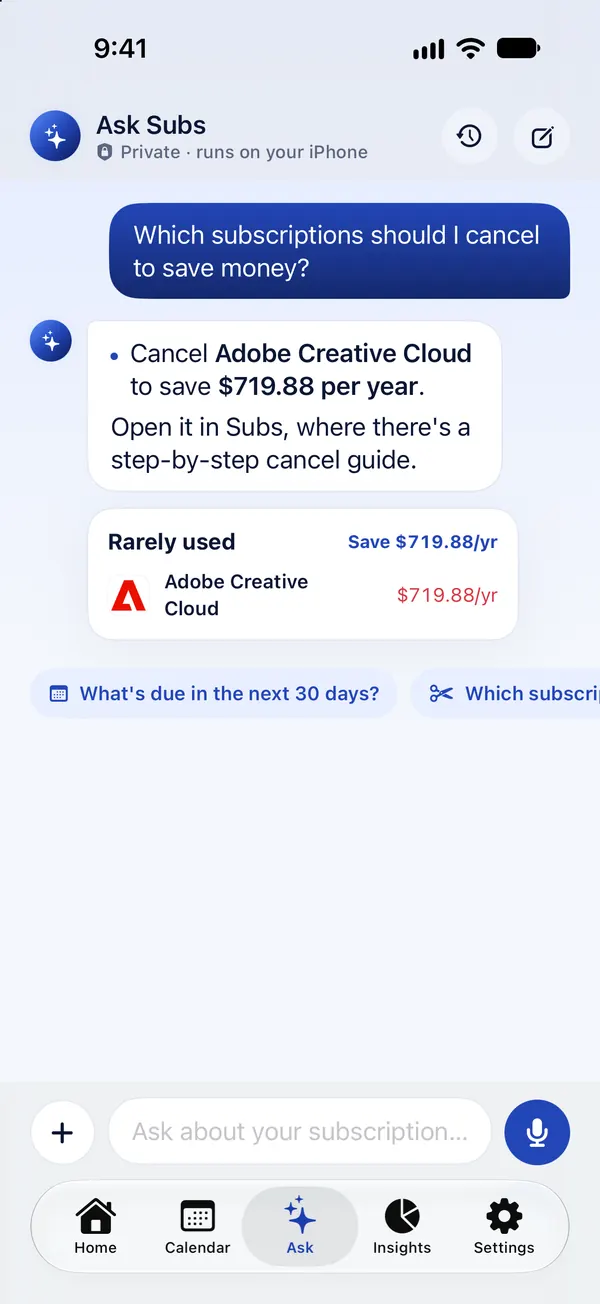
What you can ask
Ask in your own words, by typing or by voice. These are the questions it is built around:
- “What's due in the next 30 days?” A list with dates and a total.
- “Which subscriptions should I cancel?” The ones you rarely use and what canceling them saves per year.
- “When do my free trials end?” Each trial, its end date and the price afterwards.
- “Did any of my prices go up?” Old price, new price, the percentage and the yearly cost of the increase.
- “How much do I spend in a year?” The yearly and monthly totals, with a breakdown by category.
- “Am I within my budget?” How far under or over your monthly budget you are.
- “How do I cancel Netflix?” Where to cancel that subscription, based on who bills it.
What it can do for you
Ask Subs can also act on your list. Every action is shown as a button and nothing changes until you tap to confirm.
- Add a subscription: “Add Netflix, $17.99 on the 12th.”
- Record a price change: “Spotify now costs $12.99.”
- Mark something as canceled: “I canceled Hulu.”
- Write an email: “Write a refund email to Adobe” opens a cancellation or refund email, written on your iPhone, for you to review and send from Mail.
- Start an import: “Scan my statement” opens the screenshot and statement importer.
How “What should I cancel?” works
The answer comes from your own ratings, not from a guess. In the monthly check-in you mark how often you use each subscription. Ask Subs lists the ones you said you rarely use and adds up what they cost per year. If you haven't done a check-in yet, it shows your most expensive subscriptions and suggests asking yourself whether you'd sign up again today.
Totals, dates and savings are calculated from your data by the app. The language model writes the sentence around them; it doesn't do the arithmetic.
Why on-device matters
Most AI assistants send your question to a server. Ask Subs uses Apple's on-device model, part of Apple Intelligence, so:
- Your questions and the answers are processed on your iPhone and are not sent to us, to Apple or to anyone else.
- Past conversations are saved only on your device, and you can delete them in the app.
- It knows the subscriptions you track in Subs and nothing else. It can't see your bank account, your email or your other apps.
If you use voice input, Apple's speech recognition transcribes it, on the device whenever your iPhone supports that. The privacy policy has the details.
Which iPhones it works on
- Free-form chat needs Apple Intelligence: an iPhone 15 Pro or newer on iOS 26 or later, with Apple Intelligence turned on.
- On other iPhones (iOS 17 or later), Ask Subs still gives an instant answer to each of the built-in questions above, calculated from your data.
What Ask Subs can't do
- It can't cancel a subscription. It tells you where to cancel and can draft the email; you do the canceling. See the cancel guides for step-by-step help.
- It only knows what you've added. A subscription that isn't in Subs isn't in its answers. Import a statement to catch the ones you forgot.
- It isn't financial advice. It shows what you pay and what you said you don't use. The decision is yours.
Ask Subs is part of Subs Premium. The app shows the price before you subscribe.
Frequently asked questions
Is Ask Subs private?
Yes. It runs on Apple Intelligence on your iPhone. Your questions and answers are not sent to a server, and past conversations are stored only on your device.
Does Ask Subs use ChatGPT?
No. It uses Apple's on-device language model, which is part of Apple Intelligence. Nothing is sent to an outside AI service.
Do I need Apple Intelligence to use Ask Subs?
For free-form chat, yes: an iPhone 15 Pro or newer on iOS 26 or later with Apple Intelligence turned on. On other iPhones, Ask Subs still answers the built-in questions instantly from your data.
Can Ask Subs cancel a subscription for me?
No. It can tell you where to cancel, open the right page and write a cancellation or refund email for you to send, but it can't sign in to your accounts.
How does Ask Subs know what I should cancel?
From the monthly check-in, where you rate how often you use each subscription. It lists the ones you rarely use and what canceling them would save per year.
Is Ask Subs free?
No. Ask Subs is part of Subs Premium. The app shows the price before you subscribe.